Ultima Underworld color palettes
Technical Details Warning |
While the encyclopedic nature of the codex means that many articles will have information that could spoil some minor aspects of the game for newer players, this article is known to contain technical information about the game, game engine, data files, logic, etc. This information is not generally useful to the typical game players.
Continue reading at your own discretion. |
This document describes the colors palettes used in Ultima Underworld. This is highly technical behind-the-scenes info that is not useful to the typical game player.
Description[edit]
Ultima Underworld renders it's game screens in VGA (hardware mode 13h) that draws 320x200 pixels is an 8-bit paletted (256 unique colors per screen) mode. It's palette pulls from RGB colors at 6 bits per channel (18-bit true color) for a total of 262,144 unique colors. Compare that with more modern 8 bits per channel (24-bit true color) systems that have 16,777,216 colors to pick from.
Ultima Underworld has several different palettes, stored in several files. It has 8 main palettes (8-bit index, 256 colors) several 4- and 5-bit to 8-bit lookup palettes, shader lookup palettes, tranlucency lookup palettes, and palette animations/rotations. All of these things will be discussed below.
Main Palettes[edit]
The main palettes are stored in FILEData\Pals.Dat.
Each palette is 256 colors, and each color is 3 bytes, one for each channel of red, green, and blue. Though each channel only uses 6 bits, so the top 2 bits of each 8-bit byte go unused. Each palette is 768 bytes, and the file size is 6,144 bytes, so it hold exactly 8 palettes and no header or any other kind of data.
In all palettes color #0 is always the transparent color.
| # | Image | Where used |
|---|---|---|
| 0 |  |
Used in the main game screen
Not all colors are available in game, some are place holders for translucency look-ups Color #0 is transparent, color #1 is true black, colors #2-15 are mostly full-bright non-animated colors used for spell effects. Several rotations run at 5 per second:
|
| 1 |  |
Used in the map screen |
| 2 |  |
Used in the title screen
Rotation of 4 blocks of 16 colors, #64-127, each at 10 per second |
| 3 |  |
Used in the character creation screen |
| 4 |  |
Joke palette, used in the main game screen
Fire and water are blacked out, all other colors are mapped to simulate the Apple II color palette |
| 5 |  |
Used in the splash screen |
| 6 |  |
Unknown usage, duplicate of #5 |
| 7 |  |
Used in the game win screen |
All Palettes[edit]
Aside from the 8 main palettes, the game has several other palettes. These are all main screen palettes, so really they just lookup into palete #0 (and technically, palette #5)
Consider this image:

All this color data is stored in different places in the game, it is just gathered here in one image for convenient demonstration.
There are 4 blocks of colors:
- The first block is the 8 palettes from FILEdata\pals.dat, details of those are coverd in the section above.
- The second block has 3 sub-blocks:
- The first is the shades, it tells the game which color to shade a pixel when an object of the color has a certain light level on it. Notice that the fire/lava colors stay full bright all the time and that the water stays nearly full bright until the very end. This comes from FILEdata\light.dat
- The second is the same as the first, but it is used when the player is using a night vision spell. Notice that fire and water aren't affect by night vision's black and white palette. Notice that the fire and water aren't in grayscale and behave the same as the full color shading. This comes from FILEdata\mono.dat
- The third shows the palette rotations for the fire and water colors.
- The third block has two small columns:
- On the left are the 4-bit palettes used to draw item sprites and other 4-bit graphics. They are found in the file FILEdata\allpals.dat.
- On the right are the palettes used to draw the weapon POV overlay sprites. There are only two of these, one used to draw weapons wielded by players with light colored skin and the other for dark colored skin. This comes from the file FILEdata\weapons.cm
- The forth block has 6 color strips, mappings for 6 translucent colors: This comes from FILEdata\xfer.dat
- Black
- White
- Brown
- Green
- Blue
- Red
Critter Palettes[edit]
The 32 critter animations each contain 1 or more 5-bit palettes (32 unique colors each) that point back to the main palette. The 64 in-game critters link to combinations of these animations and their palettes. Some notes about the palettes in the following tables:
- In the main palette, color 0 is transparent and color 1 is true black. In all of these palettes that is reversed, color 0 is true black and color 1 is transparent.
- The palette column has been given a darker background for a better contrast to see the palettes with.
- To best see same animations with different paletes, click first the pal num column and then the anim name column.
- Each critter animation has 2 pages, one for combat animations and one for non-combat animations. Each of these two files has it's own palette, so techincally a critter could be colored differently while hostile than while peaceful, but this "feature" is never used and the two files always have the same palette.
| obj num |
npc num |
npc description |
anim num |
anim name |
pal num |
palette |
|---|---|---|---|---|---|---|
| 64 | 0 | a_rotworm | 22 | rotgrub | 0 | 
|
| 65 | 1 | a_flesh slug | 9 | slug | 0 | 
|
| 66 | 2 | a_cave bat | 3 | bat | 0 | 
|
| 67 | 3 | a_giant rat | 16 | rat | 0 | 
|
| 68 | 4 | a_giant spider | 5 | spider | 0 | 
|
| 69 | 5 | a_acid slug | 9 | slug | 1 | 
|
| 70 | 6 | a_goblin | 0 | gngob32 | 0 | 
|
| 71 | 7 | a_goblin | 14 | graygob | 0 | 
|
| 72 | 8 | a_giant rat | 16 | rat | 1 | 
|
| 73 | 9 | a_vampire bat | 3 | bat | 1 | 
|
| 74 | 10 | a_skeleton | 1 | skela | 0 | 
|
| 75 | 11 | an_imp | 18 | imp | 0 | 
|
| 76 | 12 | a_goblin | 0 | gngob32 | 1 | 
|
| 77 | 13 | a_goblin | 0 | gngob32 | 2 | 
|
| 78 | 14 | a_goblin | 0 | gngob32 | 3 | 
|
| 79 | 15 | — | 24 | batskull | 0 | 
|
| 80 | 16 | a_goblin | 14 | graygob | 1 | 
|
| 81 | 17 | a_mongbat | 18 | imp | 1 | 
|
| 82 | 18 | a_bloodworm | 22 | rotgrub | 1 | 
|
| 83 | 19 | a_wolf spider | 5 | spider | 1 | 
|
| 84 | 20 | a_mountainman&mountainmen | 27 | dwarf32 | 0 | 
|
| 85 | 21 | a_green lizardman&green lizardmen | 2 | lizman | 0 | 
|
| 86 | 22 | a_mountainman&mountainmen | 27 | dwarf32 | 1 | 
|
| 87 | 23 | a_lurker | 25 | Lurk | 0 | 
|
| 88 | 24 | a_red lizardman&red lizardmen | 2 | lizman | 1 | 
|
| 89 | 25 | a_gray lizardman&red lizardmen | 2 | lizman | 2 | 
|
| 90 | 26 | an_outcast | 26 | fight32 | 0 | 
|
| 91 | 27 | a_headless&headlesses | 20 | hedless | 0 | 
|
| 92 | 28 | a_dread spider | 5 | spider | 2 | 
|
| 93 | 29 | a_fighter | 17 | femfite | 0 | 
|
| 94 | 30 | a_fighter | 17 | femfite | 1 | 
|
| 95 | 31 | a_fighter | 26 | fight32 | 3 | 
|
| 96 | 32 | a_troll | 7 | troll | 0 | 
|
| 97 | 33 | a_ghost | 13 | ghost | 0 | 
|
| 98 | 34 | a_fighter | 26 | fight32 | 1 | 
|
| 99 | 35 | a_ghoul | 11 | ghoul | 0 | 
|
| 100 | 36 | a_ghost | 13 | ghost | 1 | 
|
| 101 | 37 | a_ghost | 13 | ghost | 2 | 
|
| 102 | 38 | a_gazer | 6 | gazer | 0 | 
|
| 103 | 39 | a_mage | 4 | wiza | 0 | 
|
| 104 | 40 | a_fighter | 26 | fight32 | 2 | 
|
| 105 | 41 | a_dark ghoul | 11 | ghoul | 1 | 
|
| 106 | 42 | a_mage | 21 | wizb | 0 | 
|
| 107 | 43 | a_mage | 8 | femwiz | 0 | 
|
| 108 | 44 | a_mage | 4 | wiza | 1 | 
|
| 109 | 45 | a_mage | 4 | wiza | 2 | 
|
| 110 | 46 | a_ghoul | 11 | ghoul | 2 | 
|
| 111 | 47 | a_feral troll | 7 | troll | 2 | 
|
| 112 | 48 | a_great troll | 7 | troll | 1 | 
|
| 113 | 49 | a_dire ghost | 13 | ghost | 3 | 
|
| 114 | 50 | an_earth golem | 19 | golem | 0 | 
|
| 115 | 51 | a_mage | 21 | wizb | 1 | 
|
| 116 | 52 | a_deep lurker | 25 | Lurk | 1 | 
|
| 117 | 53 | a_shadow beast | 28 | shadow | 0 | 
|
| 118 | 54 | a_reaper | 15 | reaper | 0 | 
|
| 119 | 55 | a_stone golem | 19 | golem | 1 | 
|
| 120 | 56 | a_fire elemental | 10 | fire | 0 | 
|
| 121 | 57 | a_metal golem | 19 | golem | 2 | 
|
| 122 | 58 | a_wisp | 23 | wisp | 0 | 
|
| 123 | 59 | — | 29 | tybal | 0 | 
|
| 124 | 60 | — | 12 | demon | 0 | 
|
| 125 | 61 | — | 31 | litening | 0 | 
|
| 126 | 62 | — | 30 | eye | 0 | 
|
| 127 | 63 | an_adventurer | 26 | fight32 | 0 | 
|
Special Colors[edit]
The main palette (palette #0) has these special colors:
| num | Color | Description | Example |
|---|---|---|---|
| 0 | this color is transparent. There is no alpha channel, any pixel in this color simply isn't drawn. | ||
| 1 | true black | ||
| 16 23 |
 |
These 8 colors are rotated (as a group of 5 and a group of 3) to make fire and lava effects | 
|
| 48 63 |
 |
These 16 colors are rotated (as 4 groups of 4) to make flowing water effects | 
|
| 251 | fake translucency, black
used by ghosts, shadow beasts, smoke from buring things |

| |
| 252 | fake translucency, white | 
| |
| 253 | fake translucency, red
not seen in game, similar effect seen in Ultima Underworld II the screenshot to the right is based on a hack to demonstrate this feature |

| |
| 254 | fake translucency, green
not seen in game the screenshot to the right is based on a hack to demonstrate this feature |

| |
| 255 | fake translucency, blue
not seen in game the screenshot to the right is based on a hack to demonstrate this feature |

|
Notes:
- There are 5 fake translucency linking colors, but there are 6 translucency lookups in FILExfer.dat. One of them is not used.
- There are 5 fake translucency linking colors, but only the black and white ones are ever used in-game. Ultima Underworld II uses a red one for the red haunt.
- The red, green, and blue ghosts in the screenshots above do not appear in the game. They are based on a hacked version of the game to demonstrate the coded but unused feature of the game engine.
PSX Version[edit]
The PSX-port of Ultima Underworld uses an entirely different engine. It is not limited to 256 colors on-screen and as such it doesn't use any of the same palette techinques that the PC version does that are described here. The PSX version stores it's graphics files in 8-bit paletted format, but each graphic can have it's own 256 color palette and the PSX hardward can display tens or hundreds of thousands of colors on the screen at once.
For all it's advantages, the PSX version does seem to have some missing features:
- It doesn't emulate the PC's palette rotation feature, so water and fire graphics are static and unanimated. Fullsize waterfalls and lavafalls are animated by vertically scrolling the texture, but the smaller ones aren't animated at all.
- The shader doesn't seem to be programmed to make the fire/lava graphics full bright, so you can see dark fire and lava which seems odd.
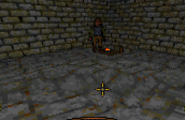
A campfire in the PC version of Ultima Underworld. Notice that the fire is drawn at full brightness regardless of distance or carried lights.
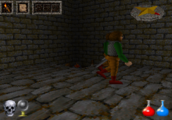
A campfire in the PSX-port of Ultima Underworld. Notice that the fire is shaded like any other object. A "dark fire" is a strange thing to see.


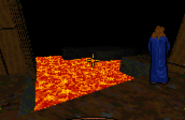
(PC) Judy waiting by the lava. Notice the lava is drawn at full brightness.
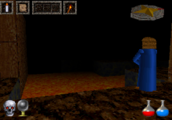
(PSX) Judy waiting by the lava. Notice the lava is shaded like the rest of the scenery.


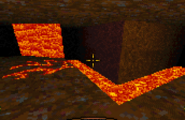
(PC) A lava fall, rivulets of lava, and a lava floor. All are drawn full bright and animated via palette rotation.
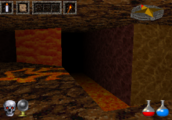
(PSX) A lava fall, rivulets of lava, and a lava floor. All are shaded like regulr textures. The lavafall is animated by vertical scrolling, the rest are not animated at all.


For more details on the differences of the PSX version, see the article Technical Differences in Ultima Underworld on the PSX
| Technical Details | |
|---|---|
| Game | Ultima III ☥ Ultima IV ☥ Ultima V ☥ Ultima VI ☥ Ultima VII ☥ Ultima VIII ☥ Ultima IX ☥ Ultima Underworld |